Popular searches
- vw app connect
- Golf mk7
- MIB2
- bmw nbtevo
- carlinkit
- porsche pcm4


VW MIB2 CarPlay/Android Auto Activation
VW MIB2 CarPlay/Android Auto Activation

Audi TT MK3 CarPlay/Android Auto Activation
Audi TT MK3 CarPlay/Android Auto Activation

SEAT MIB2 CarPlay/Android Auto Activation
SEAT MIB2 CarPlay/Android Auto Activation

Skoda MIB2 CarPlay/Android Auto Activation
Skoda MIB2 CarPlay/Android Auto Activation

JAECOO 7 4K WiFi OEM-Style Dashcam
JAECOO 7 4K WiFi OEM-Style Dashcam

BMW NBTevo ID6/ID6 Apple CarPlay Activation
BMW NBTevo ID6/ID6 Apple CarPlay Activation

PCM5 Widescreen CarPlay/Android Auto Activation
PCM5 Widescreen CarPlay/Android Auto Activation

Wireless CarPlay/Android Auto Retrofit Module
Wireless CarPlay/Android Auto Retrofit Module

Carlinkit Mini Ultra 3 - makes factory wired CarPlay wireless.
Carlinkit Mini Ultra 3 - makes factory wired CarPlay wireless.

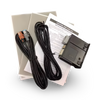
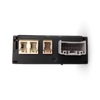
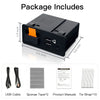


Upgrade your Mazda MZD Connect system with Apple CarPlay and Android Auto using our OEM-style retrofit kit. Designed to integrate seamlessly with the factory system for a clean, original-style installation, with everything required for the upgrade and your choice of wired or wireless connectivity.
This adds wired/wireless Apple CarPlay and Android Auto to Mazdas running the MZD Connect system. Two things decide it.
MZD Connect is the screen that sits on top of the dashboard, controlled by the rotary Commander dial between the front seats. Most Mazdas built from 2014 to 2020 have it.
On the screen: Settings → System (the tab at the top right) → About → Version Information. You will see a number such as 59.00.502A or 74.00.324A.
Not sure what you are looking at? Message us on WhatsApp before you order and we will confirm it. It is free and takes a couple of minutes.
UK stock, dispatched via Royal Mail within 1 working day.
If your item is faulty, damaged, or not as described, return it within 14 days for a refund or exchange. See full Refund Policy here

MAZDA CONNECT UPGRADE
Apple CarPlay & Android Auto
Upgrade your existing Mazda Connect system with Apple CarPlay and Android Auto while keeping the factory screen, controls and original-look interior. Choose wired connectivity or go wireless with the included adapter.


Replaces the original USB hub in your centre console for a clean, factory-style installation. No cutting, splicing or bulky aftermarket screens.

Use CarPlay and Android Auto through your existing Mazda Connect display and Commander controls, while retaining your factory cameras, DAB, Bluetooth and steering-wheel controls.

Supplied as a complete retrofit kit with the replacement USB hub, wiring and step-by-step instructions. Required Mazda Connect firmware files are also included where applicable.
Replaces the original USB hub in your centre console for a clean, factory-style installation. No cutting, splicing or bulky aftermarket screens.
Use CarPlay and Android Auto through your existing Mazda Connect display and Commander controls, while retaining your factory cameras, DAB, Bluetooth and steering-wheel controls.
Supplied as a complete retrofit kit with the replacement USB hub, wiring and step-by-step instructions. Required Mazda Connect firmware files are also included where applicable.
Frequently Asked Questions
Will this work with my Mazda?
This retrofit is designed for compatible Mazda vehicles equipped with the original MZD Connect / Mazda Connect infotainment system. Check the Vehicle Compatibility section above for supported models and years.
Do I need to update my Mazda Connect software?
It depends on your current firmware version. Older systems may require a software update before installing the new USB hub. If required, we provide the necessary firmware files and step-by-step instructions.
What is the difference between Wired and Wireless?
The Wired option connects your phone to the new USB hub using a cable. The Wireless option includes an additional adapter, allowing compatible phones to connect to CarPlay or Android Auto wirelessly.
Will my existing Mazda features still work?
Yes. Factory features such as reversing and 360° cameras, DAB, Bluetooth, steering-wheel controls and the Commander dial continue to operate as normal.
Can I still use the Mazda Commander dial?
Yes. Apple CarPlay and Android Auto can be controlled using your existing Mazda Commander controls.
Does this replace my existing screen?
No. The retrofit uses your existing Mazda Connect display. The original USB hub is replaced with the upgraded hub, enabling CarPlay and Android Auto through the factory infotainment system.
Is any coding required?
No vehicle coding is required. Some older systems may require a Mazda Connect firmware update before installation, which we provide where applicable.
Do I need to cut or modify any wiring?
No. The kit uses vehicle-specific connections and replaces the existing USB hub. No cutting or splicing of the vehicle’s wiring is required.
Can I install it myself?
Yes. The retrofit is designed to be DIY-friendly and can be installed using basic hand tools. Step-by-step instructions are included.
No products found


Buy Now, Pay Later
Pay in instalments with 0% interest through Shop Pay or Klarna

600 reviews
Rated 4.7 on Trustpilot and 5.0 on Google by customers since 2023.

Worldwide shipping
Dispatched within 1 working day, to the UK and worldwide.